The smartest recipe manager

Don't copy the recipe.
Fork it.

This is the recipe manager you've been looking for. Ask the recipe to make it dairy-free or scale it for eight. Keep the change just for tonight, or fork it. Then cook it, plan the week, get inspiration from what you already cook, and share it with your household. Forked is in beta on iOS now.

Now in beta on iOS · Always free · Import from Paprika & Recipe Keeper
Fork with visible lineage Ask the recipe Dinner from your kitchen Make mode, no memoir
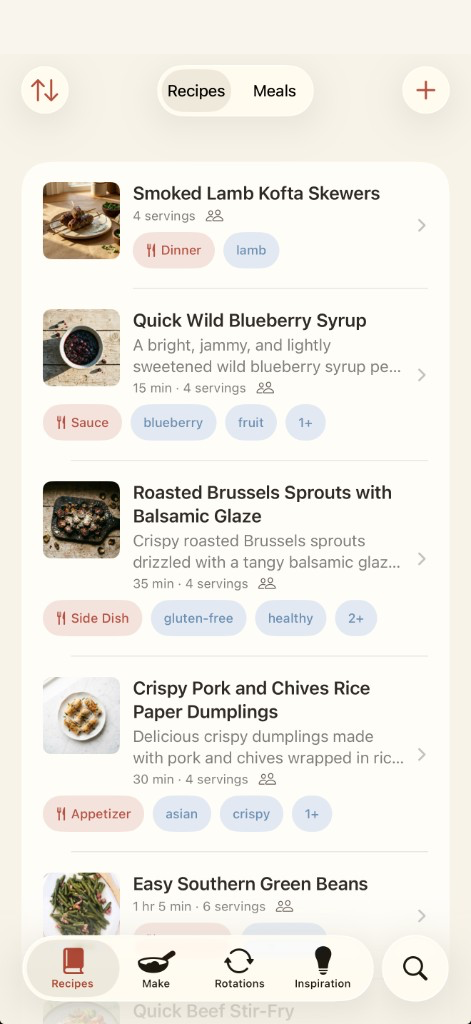
Recipe library in Forked
Screenshot Recipes

Your recipe library in Forked.

assets/screens/library.png
Your recipes
Families riff on recipes constantly. More garlic. Dairy-free. Halved for two. Forked is where those variations stay connected instead of scattering.
Features

The most capable recipe manager

A living library, cook mode, a week that fills the grocery list, Ask on the card, and dinner from what you already cook. The full job, not a single trick.

  1. 01
    Library

    Related recipes sit together

    Open a family and you’ll see the original next to the weeknight cut and the gluten-free swap, instead of Chili, Chili 2, and Chili copy sitting as three unrelated recipes.

  2. 02
    Recipe

    The recipe, then cook it

    Photo, servings, time, and a Make button. Ingredients and steps below. Tap an ingredient to swap it, change the unit, or pick a different form, without leaving the recipe.

  3. 03
    Ask

    Ask it to change

    The prompt sits on the recipe, not in a separate chat. “Halve it.” “Make it dairy-free.” “Swap the buttermilk.” Forked rewrites the ingredients and the steps. Then you choose: just for tonight, save it, or fork it so both versions stay. If the recipe belongs to someone else, save is off the table. You get just-for-now or a fork, with theirs untouched.

    Forked Plus
  4. 04
    Lineage

    Every fork remembers where it came from

    One tap to fork any recipe. Source site, original, and household forks show up as a tree, so you can see which version you’re looking at and what it came from.

  5. 05
    Make mode

    Cook the card, not the blog

    One step at a time, with the ingredient for that step. If the instruction says “roast 45 minutes,” a timer starts. Cooking two dishes at once keeps two separate places. No memoir, no ads, no pinch-to-zoom.

  6. 06
    Plan & shop

    The week fills the list

    Build a weekly rotation: recipes, whole meals, or a placeholder for takeout. Days are optional. The grocery list builds from that week, quantities combined. Halve a recipe and the groceries halve with it. Share the list when you walk the store.

  7. 07
    Household

    One library, and nobody overwrites anybody

    Everyone cooking for the same table shares one library. Change someone else’s recipe and you get a fork, with theirs untouched.

Inspiration

Dinner from your kitchen

Most recipe managers suggest from a big catalog. Inspiration starts with what you have actually cooked, not just what you have saved. If you need something that isn’t there yet, it can write a recipe.

The canvas

A main and its sides

The main sits in the middle, with sides around it. Tap an empty spot to search your library, find something new, put down a placeholder like “something with chicken,” or import a recipe you just found.

  • Add a main and Forked suggests sides from your library that go with it.
  • Or start with sides, and ask for a main that fits them.
  • Give the meal a name and you can cook it again later.
Tonight

Time, servings, leftovers

Say how long you have, how many you’re feeding, and what needs using up. Suggestions stay inside those limits.

≤ 30 min total 4 servings must use: leeks must use: half a lemon
Vibes

Tuesday and a dinner party aren’t the same night

Pick a vibe and the screen takes on that color. There are a bunch built in, and you can type your own if none of them fit.

quick weeknight cozy family dinner party romantic spicy healthy up-leveled one-pot make-ahead adventurous + your own
Find a new recipe

Something you’ll like, or something different

After enough recipes, Forked knows the difference between dishes you have actually cooked and ones you have only saved. Ask for something you’ll like, rooted in that neighborhood, or something different on purpose, bridged from a dish you already love.

  1. 1

    Reads what you cook

    What you have actually made is the starting point, not a generic catalog.

  2. 2

    Shows a few options first

    Titles, times, and why each one fits. You pick before it writes the recipe.

  3. 3

    Writes the recipe

    Ingredients and steps, scaled to the servings you set.

  4. 4

    Saves to your library

    Then you can fork it, put it on the week, or add it to the grocery list.

The ideas are free. Forked Plus writes the one you pick into a real recipe (ingredients, steps, ready to cook) and can generate a photo to go with it. Ask twice in one sitting and you won’t get the same answers. It remembers what it already showed you. Dietary restrictions apply throughout.

Bring your recipes

Already have hundreds of recipes?

Bring the whole library over in one pass. You don’t start from scratch.

Paprika import Recipe Keeper import Save from any web link Save from a photo ChatGPT share links Describe a new recipe
✓247 recipes found in your Paprika export
✓Photos, notes, and categories preserved
✓Ready for your household to fork
Compared

If you’re coming from somewhere

An honest comparison, including where we lose.

Now in beta

Your kitchen already improvises.
Let it stick.

Forked is in beta on iOS. Always free. Forked Plus is one price for the household. See pricing

Join the beta →